Buy Xbox Series X|S for the Way You Want to Game
If you want to buy Xbox Series X|S, the biggest decision is choosing between two consoles designed for different types of players.
The Xbox Series X emphasizes performance and, depending on the configuration, can provide physical-disc capability. The Xbox Series S is smaller, digital-focused, and can be a more affordable way to get into current Xbox gaming.
At Oro Express Mesa Pawn & Gold, our pre-owned gaming inventory may include Xbox Series X and Series S consoles, controllers, games, storage accessories, and other gaming equipment.
Before choosing, focus on four things:
- Performance: How important are graphics and higher-end gaming performance?
- Physical games: Do you own or want to buy games on disc?
- Storage: How many games do you typically keep installed?
- Price: Are you paying for features you’ll actually use?
Understanding those differences makes it much easier to choose the Xbox that fits how you play.
Xbox Series X vs. Series S: What’s the Difference?
Both consoles provide access to the current Xbox ecosystem, but they aren’t interchangeable.
Xbox Series X
The Series X is generally the better fit for customers who prioritize:
- Higher-end gaming performance
- More capable graphics
- Larger storage configurations
- Physical games on appropriate models
- A premium living-room gaming setup
- Keeping numerous large games installed
The Series X can make particular sense when Xbox will be your primary gaming system and you have a television capable of taking advantage of its higher-end capabilities.
Xbox Series S
The Series S takes a different approach. It’s compact, digital-only, and typically provides a lower-cost entry into current Xbox gaming.
Consider a Series S if you primarily want:
- Digital games
- Game Pass
- Casual gaming
- A first Xbox
- A console for a bedroom or secondary TV
- A gaming system for a child
- A second console
- A lower initial purchase price
The Series S isn’t simply a cheaper Series X. It’s designed for customers whose priorities don’t necessarily require the additional capabilities of the Series X.
1. Decide Whether You Need Physical Games
This should be one of your first decisions.
The Xbox Series S is digital-only. You cannot insert a physical Xbox game disc into it.
That’s perfectly reasonable if you already purchase everything digitally. It may be a problem if you own a collection of compatible physical games or enjoy shopping for pre-owned game discs.
A disc-capable Xbox gives you additional flexibility:
- Buy compatible physical games
- Shop for pre-owned games
- Continue using compatible discs you already own
- Build a physical game collection
- Still purchase and download digital games
If physical games matter to you, confirm that the specific Xbox you’re considering has the disc capability you need. Don’t assume every console within a product family has the same configuration.
2. Think About How Much Performance You Need
The Series X is Microsoft’s higher-performance option.
That doesn’t automatically make it the better purchase.
You may appreciate the additional capability if you:
- Play demanding games
- Care substantially about graphics
- Use a larger or higher-end television
- Want Xbox to be your primary gaming system
- Expect to keep the console for a long time
A more casual gamer may not place the same value on those differences.
If your Xbox is going into a bedroom, will primarily be used by a child, or is simply a second gaming system, a Series S may provide everything you’re looking for.
Pay for performance when performance matters to you.
3. Consider Storage Before You Buy
Modern games can take up substantial storage space.
This is especially important with Series S because the system is built entirely around downloaded games.
Your storage needs depend largely on how you play.
Less storage may be fine if you:
- Keep only a few games installed
- Play one or two games for long periods
- Don’t mind deleting games you’ve finished
- Are comfortable managing your game library
More storage may be valuable if you:
- Keep many games installed
- Play several large titles
- Share the console with family members
- Have a large digital library
- Don’t want to frequently manage storage
Compatible storage expansion may be available, but it adds to your total cost.
When comparing two consoles, consider the storage you’ll ultimately need rather than looking only at today’s price.
Game Pass Can Change Which Xbox Makes Sense
Xbox’s subscription-based gaming ecosystem is an important reason some customers choose the platform.
If you expect much of your gaming to come through Game Pass and digital downloads, you may place less importance on a disc drive.
That can make the Series S particularly interesting.
A Game Pass-focused customer may care more about:
- Storage
- Download speeds
- Digital gaming
- Console performance
- Subscription cost
- Games available through the service
Game Pass plans, pricing, and game availability can change, so check Microsoft’s current offerings before subscribing.
The important point is simple: how you plan to get your games should influence which Xbox you buy.
Series X Makes More Sense for Some Existing Xbox Owners
Upgrading from an Xbox One or another earlier Xbox can change the decision.
You may already have:
- Physical Xbox games
- Digital Xbox games
- An Xbox account
- Saved data
- Controllers or accessories
- Friends who play on Xbox
If you own compatible physical games that you still want to use, disc capability becomes much more important.
If your entire library is already digital, you have more flexibility.
Compatibility can vary by game, accessory, and feature, so verify anything particularly important before purchasing a new console.
Buying Your First Xbox?
If this is your first Xbox, don’t make the decision more complicated than necessary.
Start with these questions:
- Which games do I want to play?
- Will I buy games digitally or physically?
- How important is gaming performance?
- How many games will I keep installed?
- What television or monitor will I use?
- What’s my complete budget for the console, controller, games, and accessories?
Your answers should point you toward Series X or Series S fairly quickly.
Series S Can Make an Excellent Second Console
Not every Xbox needs to be the primary gaming system in the house.
A Series S can be particularly attractive if you already have another console and want an Xbox for:
- A bedroom
- A second television
- A vacation home
- Children
- Game Pass
- Xbox-exclusive games
- Occasional gaming
In those situations, spending more for a Series X may provide little additional value.
But if the second console is being purchased specifically for higher-performance gaming, the Series X may still be worth considering.
Buying an Xbox for a Child
Parents and grandparents don’t need to memorize Xbox specifications.
They do need to know which Xbox the child expects.
Before buying, try to find out:
- Which games they want
- Whether their friends use Xbox
- Whether they own physical games
- Whether they’ll use Game Pass
- Which Xbox model they asked for
- Whether they’ll play on a bedroom TV or the main family television
A Series S can be an attractive option for a younger gamer with a digital library.
A Series X may make more sense if the child already owns physical games or specifically wants the higher-end system.
Don’t choose solely by price when buying a gift.
Buying an Xbox for the Family
A shared Xbox can have different requirements from a console used by one person.
Consider:
- Number of players
- Additional controllers
- Number of games installed
- Storage requirements
- Physical vs. digital games
- Multiplayer games
- Subscription costs
Storage can become especially important when several family members have their own games installed.
Controllers can also significantly affect the total purchase price.
Controllers Are Part of the Cost
When comparing pre-owned Xbox consoles, look at what you’re actually getting.
Ask whether the system includes:
- Xbox controller
- Power equipment
- HDMI cable
- Storage accessories
- Other gaming accessories
A console priced lower without a controller may ultimately cost more than another package that includes everything you need.
If you plan on local multiplayer, factor additional controllers into your budget as well.
Match Your Xbox to Your Television
Your television can help determine whether paying more for Series X makes sense.
Series X may be more appealing when:
- You have a higher-end television
- Gaming performance is important
- You care about resolution and frame rates
- You want to get more from demanding games
Series S may be enough when:
- You’re using a smaller television
- The console is going into a bedroom
- You’re a more casual gamer
- Price matters more than maximum performance
You don’t need an expensive television to enjoy either Xbox.
But there’s little reason to pay for capabilities that aren’t particularly important to your gaming setup.
If you’re upgrading both pieces of equipment, our Used TV Store can help you compare pre-owned televisions as well.
Xbox Series X|S vs. PlayStation 5
If you’re deciding between Xbox and PlayStation, don’t begin with a technical specification chart.
Start with:
- Games: Which titles do you want?
- Friends: Which platform do the people you play with use?
- Existing library: Do you already own Xbox or PlayStation games?
- Subscriptions: Which gaming services appeal to you?
- Physical media: Do you own game discs?
- Controller: Do you strongly prefer one platform’s controller?
If you’re already invested in Xbox, staying within that ecosystem can be convenient.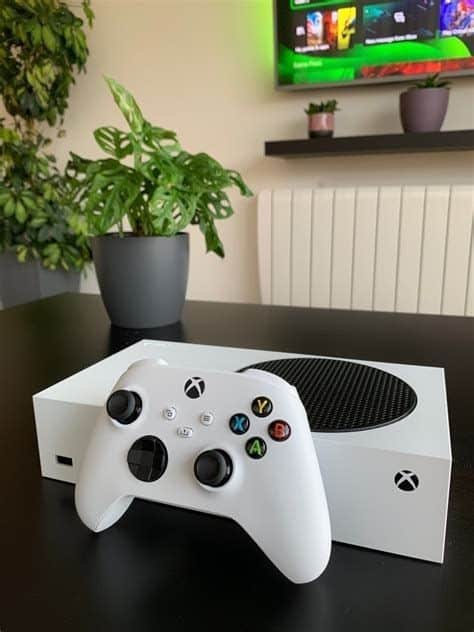
If you’re genuinely undecided, our Buy PlayStation 5 page explains Sony’s platform in more detail.
Xbox Series X|S vs. Nintendo Switch
Nintendo Switch serves a different type of gaming experience.
The distinction is easiest to understand this way:
Xbox Series X|S
- Primarily a home-console experience
- Xbox game ecosystem
- Game Pass
- Performance-focused Series X option
- Digital-focused Series S option
Nintendo Switch
- Nintendo’s game franchises
- Portable gaming on appropriate models
- Family-oriented gaming
- Handheld and television flexibility depending on model
If portability and Nintendo’s games are important, see our Nintendo Switch guide.
If you’re still deciding among all three platforms, our Gaming Console Store page is the better starting point.
Xbox or Gaming PC?
An Xbox offers a standardized gaming experience.
A gaming PC gives you considerably more hardware flexibility, but also more decisions.
With a PC, you may need to consider:
- Processor
- Graphics card
- RAM
- Storage
- Monitor
- Peripherals
- Upgradeability
If you simply want to sit down and play games, the simplicity of a console can be a significant advantage.
If you also need a computer or specifically want PC gaming, compare the options in our Used Computer Store Mesa before deciding.
Buying Pre-Owned? Compare the Actual Xbox
Two pre-owned Xbox consoles with the same name aren’t necessarily equivalent purchases.
They can differ in:
- Storage
- Disc capability
- Physical condition
- Controller
- Cables
- Included accessories
- Packaging
- Previous use
- Price
Before a gaming console reaches our retail inventory, we identify the system and consider its configuration, physical condition, functionality, included equipment, and current market.
When you’re shopping, look at the individual Xbox rather than treating every Series X or Series S as identical.
How to Compare Two Pre-Owned Xbox Consoles
When you have two systems in front of you, compare them in this order:
- Exact model: Series X or Series S?
- Disc capability: Can it use physical games?
- Storage: How much does the configuration provide?
- Condition: What does the actual console look like?
- Controller: Is one included?
- Accessories: What else comes with it?
- Price: What’s the complete cost of the setup you need?
That last point matters.
A lower-priced console isn’t necessarily the better value if you immediately need to buy a controller, additional storage, or other equipment.
Cosmetic Wear Doesn’t Affect Every Buyer the Same Way
Pre-owned consoles may show signs of normal use.
Decide how much that matters to you.
If the Xbox will sit beside a television where you barely see it, minor cosmetic wear may not be important.
Another customer may prefer paying more for a cleaner-looking system.
Neither approach is wrong.
The important thing is seeing the actual console and deciding whether its condition and price make sense to you.
Looking for a Particular Xbox?
Our inventory comes from individual gaming systems we purchase for resale rather than shipments of identical new consoles.
Depending on current inventory, we may have:
- Xbox Series X
- Xbox Series S
- Different storage configurations
- Disc-capable Xbox configurations
- Digital-only configurations
- Xbox controllers
- Physical games
- Storage accessories
- Other gaming equipment
If you’re flexible, visit the store and compare what’s available.
If you’re specifically searching for one Xbox model, storage configuration, or other feature, call ahead before making a special trip.
Frequently Asked Questions About Xbox Series X|S
What’s the biggest difference between Xbox Series X and Series S?
Series X is Microsoft’s higher-performance option. Series S is smaller, digital-only, and generally designed as a more affordable way into current Xbox gaming.
Does Xbox Series S play game discs?
No. Series S is designed for digital games.
Does every Xbox Series X have a disc drive?
Don’t assume so. Series X has been offered in different configurations. If physical games matter to you, confirm the capabilities of the exact console you’re buying.
Is Series S good enough for casual gaming?
For many customers, yes. If you primarily want current Xbox games and don’t need the higher-end performance or physical-media capabilities available with certain Series X configurations, Series S can make a lot of sense.
Is Series X worth paying more for?
It can be if you’ll benefit from the additional performance, want the capabilities of a particular Series X configuration, or have a gaming setup that can take greater advantage of it.
Is Series S good for Game Pass?
Its digital-focused design can make it appealing for Game Pass users. Check Microsoft’s current plans, prices, and available games before subscribing.
How much storage do I need?
That depends primarily on the number and size of games you keep installed. Large digital libraries generally benefit more from additional storage.
Do your Xbox consoles include controllers?
It depends on the individual system. Ask what’s included with the Xbox you’re considering.
Do you sell Xbox games and accessories?
Games, controllers, storage accessories, and other gaming equipment may be available depending on current inventory.
Can I call before visiting?
Yes. If you’re looking for a specific Series X or Series S configuration, call ahead to check current availability.
Buy Xbox Series X|S Based on What You’ll Actually Use
If you’re ready to buy Xbox Series X|S, the better console isn’t automatically the more expensive one.
Choose based on what matters to you:
- Choose Series X when higher-end performance or the features of a particular Series X configuration matter.
- Choose Series S when you want a compact, digital-focused Xbox and don’t need the additional capabilities of Series X.
- Consider storage based on the number of games you’ll actually keep installed.
- Consider physical media before committing to a digital-only console.
- Compare included equipment when shopping pre-owned.
- Calculate the complete cost, including controllers, storage, games, and accessories you’ll need.
At Oro Express Mesa Pawn & Gold, you can compare the individual pre-owned Xbox consoles currently available instead of choosing solely from a specification sheet.
Visit the store to see what’s in stock, or call ahead if you’re looking for a particular Xbox Series X or Series S configuration.